Superhostem.cz Help Center

Legislation in the Czech Republic

How to register for Ubyport

If you are short-term accommodation of guests in the Czech Republic, you must also deal with reporting foreigners to the foreign police. A practical way is to register for Ubyport, where you will get access data for working with accommodated guests.

Help Center Previous article Next article →
What awaits you next?

First, you will find out if you already have registration and your IDUB. If not, fill out the application for registration of a new accommodation facility, send it the correct way to the Directorate of the Foreign Police Service and, after approval, save the access data to Superhostem.

First, clarify your situation

I don't have registration yet

You do not have an IDUB and you have never registered an accommodation facility in Ubyport.

I'm registered, but I'm missing data for web services

You are already registered in Ubyport, but you need data for automated data entry to connect to Superhost.

When to use this guide

This article makes sense when you are setting up your first property and you are missing the data for the section Ubyport. Without them, you may have an established property, but it will not be completely ready for follow-up on guest reports.

If you haven't registered yet

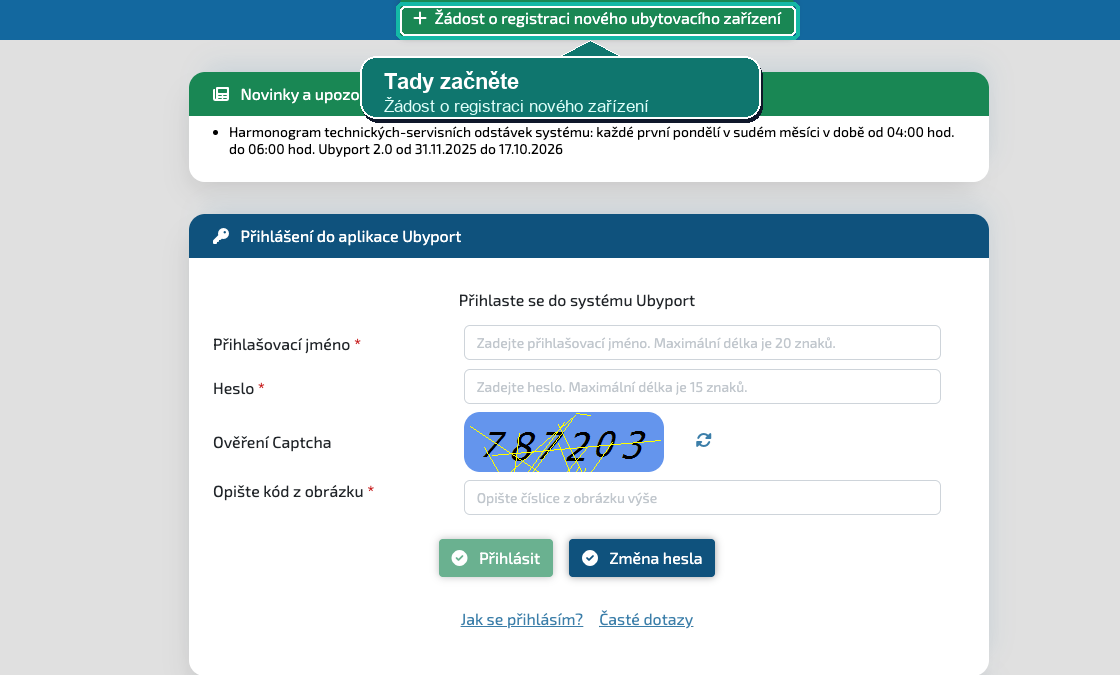
Open the Ubyport portal

On the foreign police portal, open Ubyport and select the request for registration of a new accommodation facility.

Open the official Ubyport

Fill out the registration form

Fill in the mandatory information about yourself and the accommodation facility. Pay particular attention to the correct address of the property and the contact email, which will then receive information from the police.

The police specifically state that the form is to help prevent data entry errors, so it's a good idea to double-check everything before generating the PDF.

Also apply for a web services account

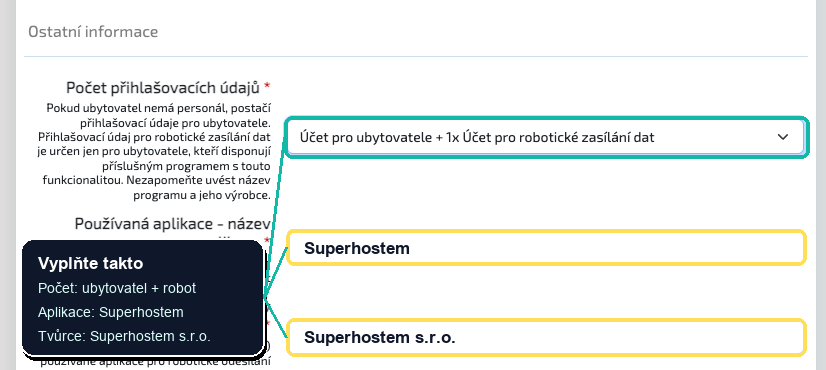
If you want to connect Ubyport to Superhost, normal registration is not enough. You also need data for web services, that is, an account designed for automated data entry.

Expect that you need as a result two credentials:

  • 1x bill for accommodation provider for normal access to Ubyport
  • 1x account for robotic data sending to connect to Superhost

If you provide data about the connected application in your application or communication with the police, use:

  • Application name: superhostem.cz
  • Name of program creator: Superhost s.r.o.

You will then store the data for robotic or web data transmission in the system.

Generate a PDF application and send it the right way

After filling out the form, download the generated PDF document and send it to the Directorate of the Foreign Police Service by one of the official channels.

  • data box on ybndqw9
  • by electronically signed e-mail to reguby@pcr.cz
  • by registered mail to the address Directorate of the Foreign Police Service, Prague 3, Olšanská 2, postal code 130 51
  • in person at ŘSCP, Prague 3, Olšanská 2, entrance A

If you operate multiple addresses, registration is handled individually.

Wait for the data to be allocated

After processing, the Foreigners Police will send you a log with login data. According to the official instructions, processing can take up to 30 days according to the administrative regulations.

If you have an accessible data box as a natural person, business natural person or legal entity, the log can come to you right there.

Save data to Superhost

Once you get them, add them to the specific property settings. For automation, you primarily need data for web services.

When you already have registration

Check if you have data for web services

Connecting to Superhost does not work only with regular access to Ubyport. You need data intended for robotic or web-based data entry.

If you were already registered in Ubyport 1.0, the police state that the original access data are still valid for Ubyport 2.0 and there is no need to register the device again.

If you don't have them, ask for them to be created

If you already have a registration, send a request to create a web services account for the program by mailbox superhostem.cz, i.e. account for robotic data sending.

Just write it normally in the content of the data message. List yours IDUB and a request to create a robotic data submission account for superhostem.cz.

Wait for a response and save accesses to the system

As new data arrives, put it into your property settings in Superhost to automatically follow up on guest reports.

What to watch out for

  • normal login to Ubyport is not enough if you want to connect to the system
  • registration is handled according to the address of a specific accommodation facility
  • if you have multiple addresses, you must count on multiple registrations
  • the contact email in the form must be correct, because the access data will arrive there
  • without a data box, the whole process is more complicated
  • if the device does not have an address kept in the RÚIAN, the police recommend that you enter the address of the local competent municipal office and explain the location in a note

What does this mean for setting up real estate?

Ubyport is one of the three important parts that you usually complete after establishing your first property along with stay fee a iCal connection.

Verification and sources

This article is a practical guide, not legal advice. We prepared the procedure according to the official Ubyport portal and the instructions of the Police of the Czech Republic.

Related links

Overview Help Center Previous How to add your property Another one How the stay fee works